
Voice Outbound Campaigns
The following are the different outbound campaigns you can create using Webex Campaign Management:
- Standard preview
- Direct preview
- Progressive
- Predictive
- Progressive IVR
- Predictive IVR
Standard preview
A Preview dialing mode allows an agent to view the contact information before a call is initiated. Upon creating a campaign and assign to a team, the agent can view the contact's information. After viewing the information, an agent can accept or reject the call. If an agent accepts the call, the system places the call to the customer.
In this mode, the dialer places the outbound call to the customer. If the customer accepts the call, the agent will be connected with the call and CPA can be applied. If the call reaches an answering machine detection (AMD) or voicemail after ringing, the agent can leave a voicemail manually.
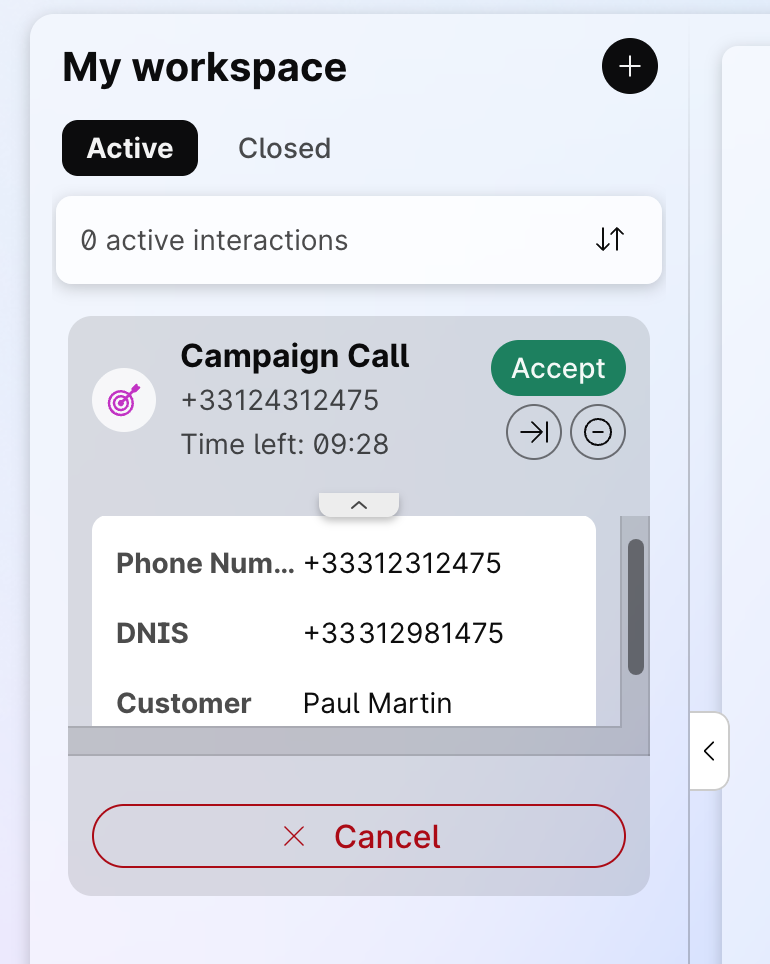
You can define up to 30 fields in the incoming popover within the flow. You can prioritize the most important fields by placing them at the top (in the Agent Desktop configuration). A scroll bar allows you to navigate through all the fields.
Direct preview
A Direct preview dialing mode allows an agent to view the contact information before a call is initiated. Upon creating a campaign and assign to a team, the agent can view the contact's information. After viewing the information, an agent can accept or reject the call. If an agent accepts the call, the system places the call to the customer.
In this mode the customer call is directly added to the reserved agent and the agent hears the call ring out. No CPA is available. The agent can then apply a wrap code.
'Live Voice' Telephony outcome is not received back from the dialer in case of Direct preview because CPA (Call Progress Analysis) is not available for 'Direct preview' dialing mode.
Progressive dialing mode
Agents don't need to manually initiate the outbound call in the Progressive dialer. When an agent completes a call and moves to the Available state, the dialer will automatically reserve the agent and dials one or more contacts for every available agent (based on the configured lines to dial per agent). In progressive mode, the number of lines to dial is fixed based on the configuration of the campaign.
Predictive dialing mode
Predictive campaign calls are very much similar to progressive calls. Agents don't need to manually initiate the outbound call in the Predictive dialer. When an agent completes a call and moves to the Available state, the dialer will automatically reserve the agent and dials one or more contacts for every available agent (based on the current lines to dial per agent). In predictive mode, the number of lines to dial varies throughout the day in order to maximize agent efficiency while maintaining the configured abandon rate on the campaign.
Progressive IVR
An Interactive Voice Response (IVR) dialing mode allows a computer to interact with humans through voice and DTMF tones input via a keypad. An outbound call is initiated by the system to a contact, when the contact picks up the call it provides options to direct the call to the appropriate department or agent. After the right option is selected, the call gets connected to the agent.
Predictive IVR
In Predictive IVR dialing mode, the system utilizes predictive analytics to personalize and optimize the caller experience. It analyzes data to anticipate caller needs, route calls efficiently, and provide tailored information or options.
Using the End Flow node in an IVR flow can result in the call session not being properly terminated at the telephony level. In such cases, although the flow execution ends, the call itself may remain 'active' or appear to 'hang' because the required disconnect signal is not sent to release the call resources.
Therefore, in your flow, please use the "Disconnect" activity instead of the "End Flow" activity.
For more information, refer to https://help.webex.com/en-us/article/nhovcy4/Build-and-manage-flows-with-Flow-Designer#task-template_d2a0ed61-0f50-4e0f-9e38-7359ec8d815d
Updated 4 months ago