
Remove duplicate contact records within a contact List
This feature allows you to remove duplicate records from contact lists created through SFTP or manual file uploads. It does not apply to contact lists created through APIs.
- Changes made to this configuration while a campaign is in the Paused or Draft state apply only to contact lists created after the changes are saved. Those changes will not apply to already created contact lists.
- Duplicate records are identified only within an individual contact list, not across multiple contact lists. Records classified as duplicates are excluded from further processing and do not appear in Search Contacts results.
Using the Remove duplicate contact records node, you can identify records that contain the same value for a selected attribute and determine which records to retain by applying a survivor-selection criterion.
A survivor is a record retained after the duplicate-removal criterion is applied. Depending on the selected criterion and the contact data, a duplicate group may contain more than one survivor.
Prerequisites
- The duplicate removal feature is enabled for the tenant. When the feature is disabled, duplicate related controls and counts are hidden.
- A campaign must be available for configuration. if a campaign is in Running or Pending state it must be paused before modifying the configuration.
- Attributes with the DATETIME data type cannot be used to identify duplicate records.
Define criteria to remove duplicate contacts
Follow these steps to remove duplicate contacts from contact lists.
- Click the ellipses icon on the Additional contact list options node.
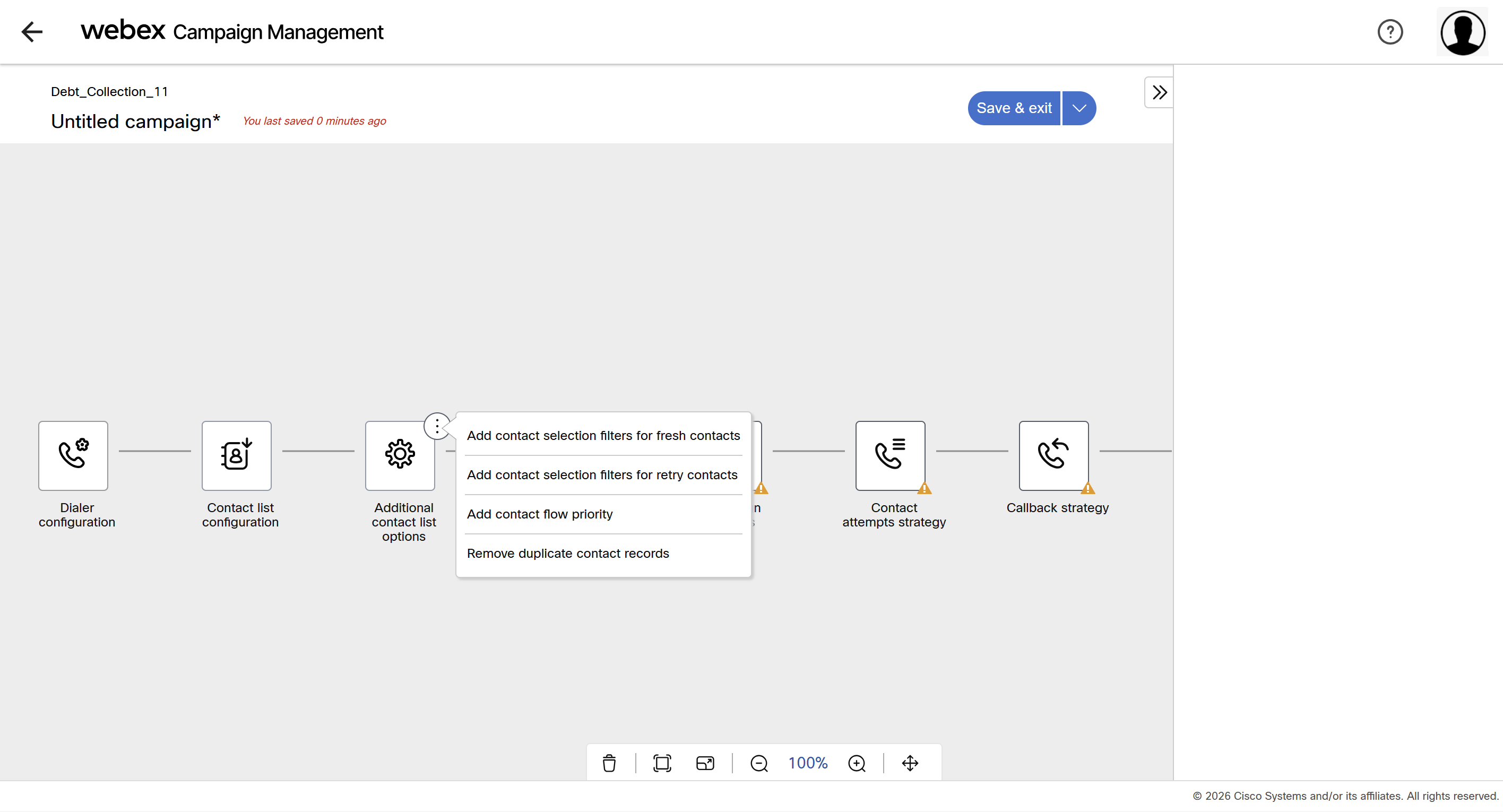
- Click Remove duplicate contact records. A new node is added, and its configuration options appear in the right pane.
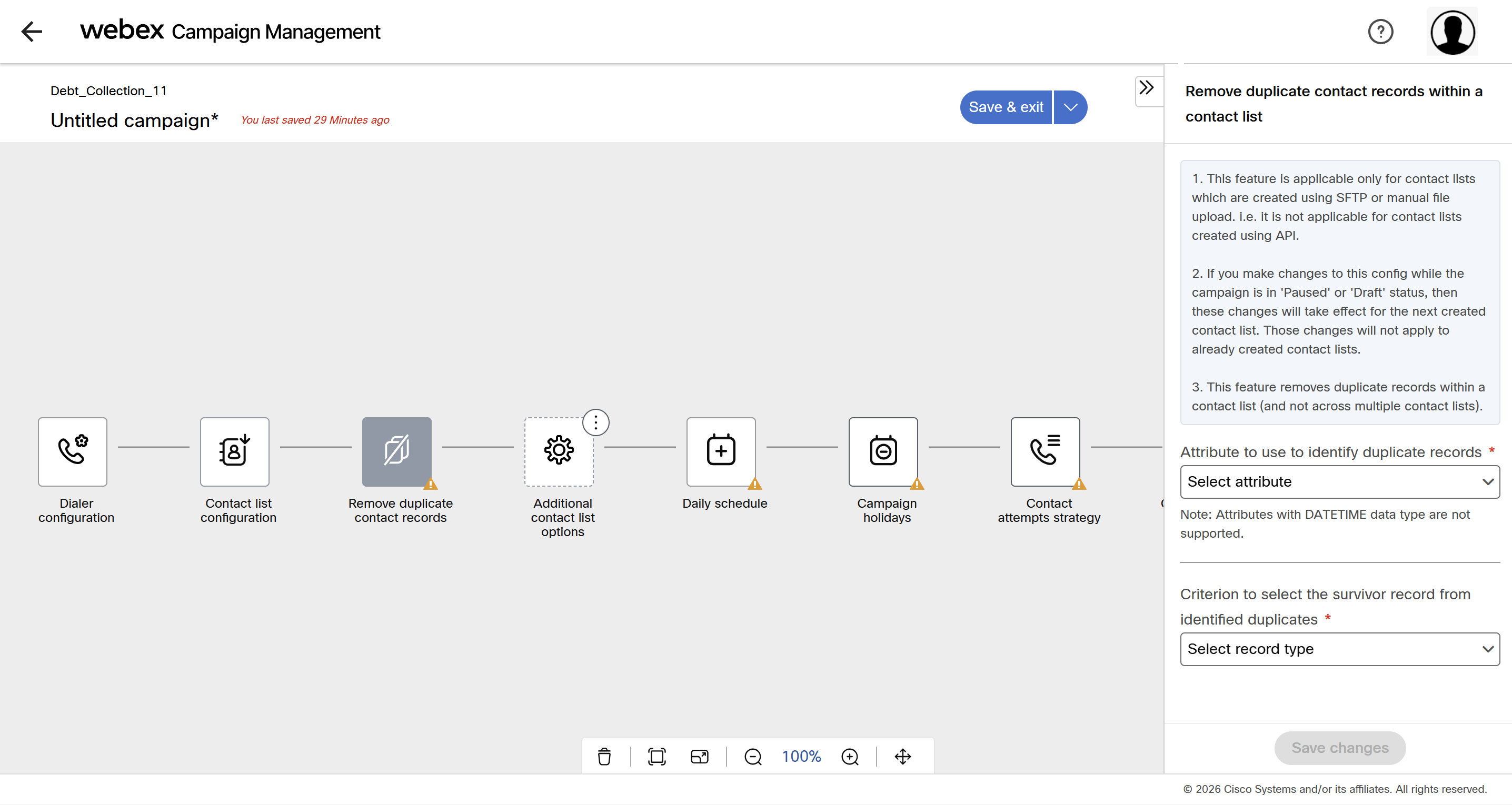
- Configure the following options:
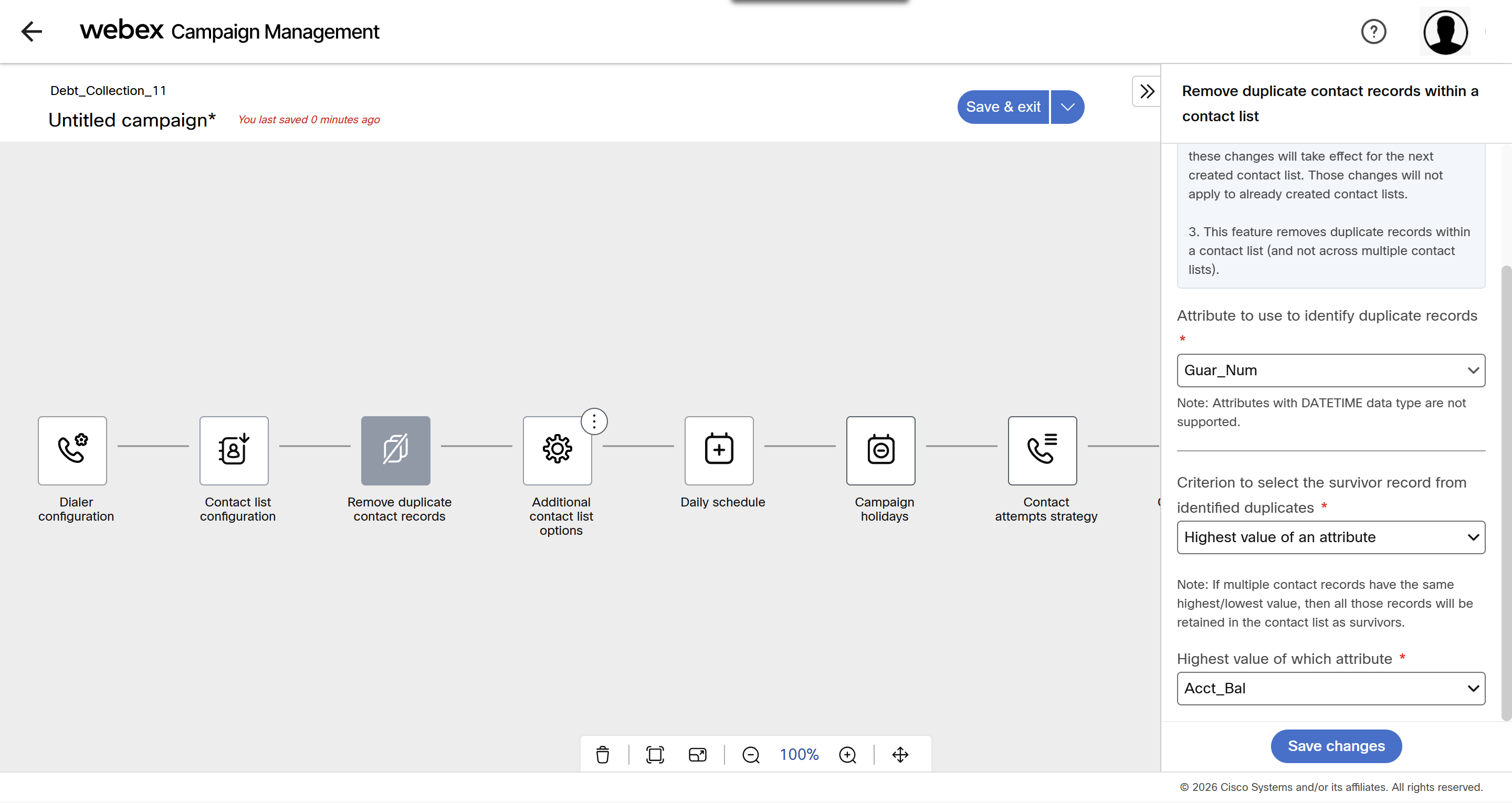
- Attribute to use to identify duplicate records: Select the attribute that the system must compare to identify duplicate records within a contact list.
- Criterion to select the survivor record from identified duplicates: Select the criterion that determines which records are retained after duplicates are identified. The retained records are called survivors; all other records in the group are excluded from further processing.
For example, suppose two records have the same guarantor number and account balances of 711 and 139. If you select Highest value and use the account-balance attribute for comparison, the record with a balance of 711 is retained.
You can choose an option from the below:- Highest value — Retains records containing the highest value for the selected attribute.
- Lowest value — Retains records containing the lowest value for the selected attribute.
- Specific value — Retains records whose selected attribute matches the value you specify.
- Random — Retains the first record in the source file from each duplicate group.
With highest or lowest value selection, all records tied at the selected value are retained.
- Attribute to compare a specific value Select the attribute that the system must compare with the value you enter. This option is available when Specific value is selected. For example, if you select Acct_Bal and enter 100 as the specific value. Within each identified duplicate group, records whose account balance equals 100 are retained as survivors.
- Value of the contact record(s) to keep This option is available when Specific value is selected. Enter the value that records must contain in the selected comparison attribute to be retained as survivors.
For example, if the comparison attribute is Acct_Bal and you enter 100, records in each identified duplicate group with an account balance of 100 are retained.
- Click Save changes.
Examples
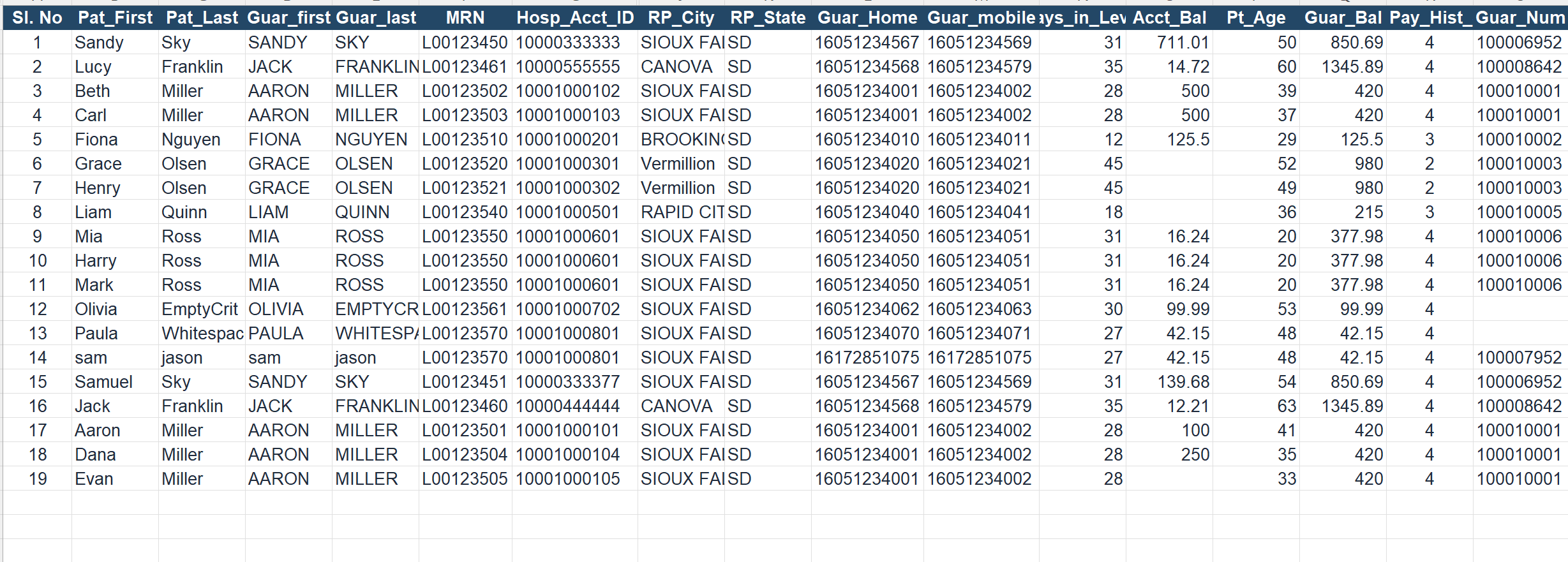
Let us look at few examples of how duplicate records are identified. For this example, we will use a sample healthcare contact list.
Example 1: Identifying duplicate records of same guarantor for different patients based on highest value of an attribute
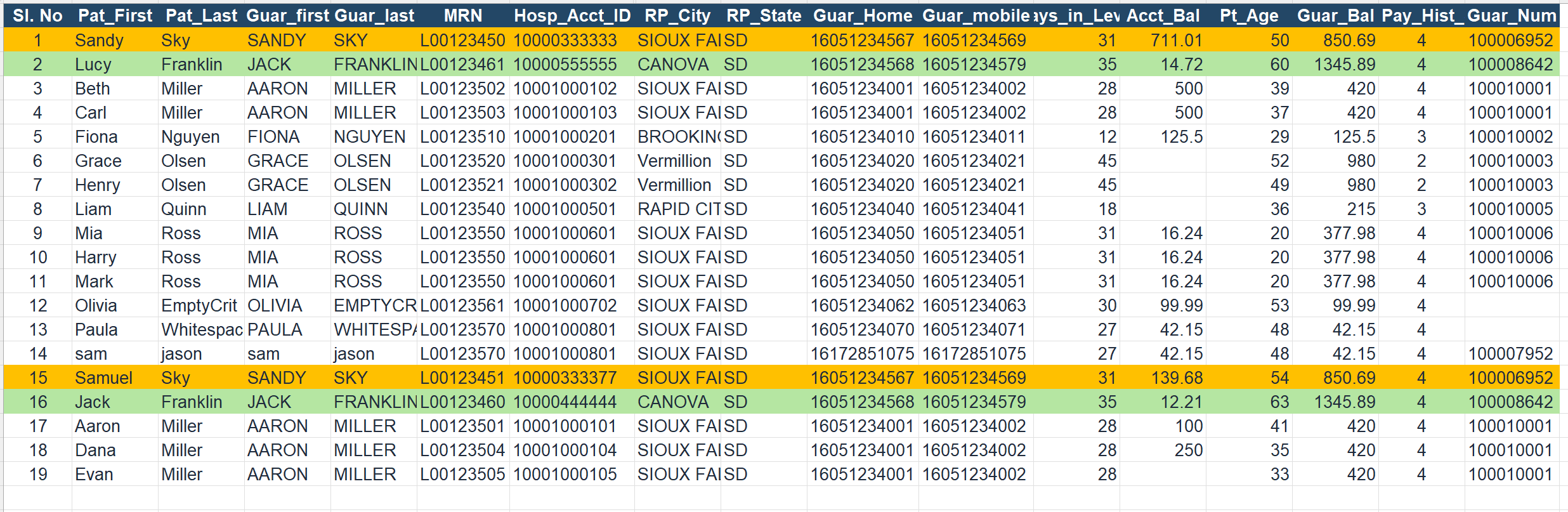
We have configured Attribute to use to identify duplicate records as Guar_Num and highest value of an attribute Acct_bal. The system has identified 2 records that has same guarantor.
In the below example, sl. no 1 and 15 are different records, but they share the same guarantor responsible for paying their hospital bills.
Similarly sl.no 2 and 16 are different records, but they share the same guarantor responsible for paying their hospital bills.
The system will retain the record with highest account balance and tag the other record as duplicate.
The system has identified the record 15 and 16 as duplicates.
Example 2: Identifying duplicate records of same guarantor for different patients when highest value of an attribute is same for few records
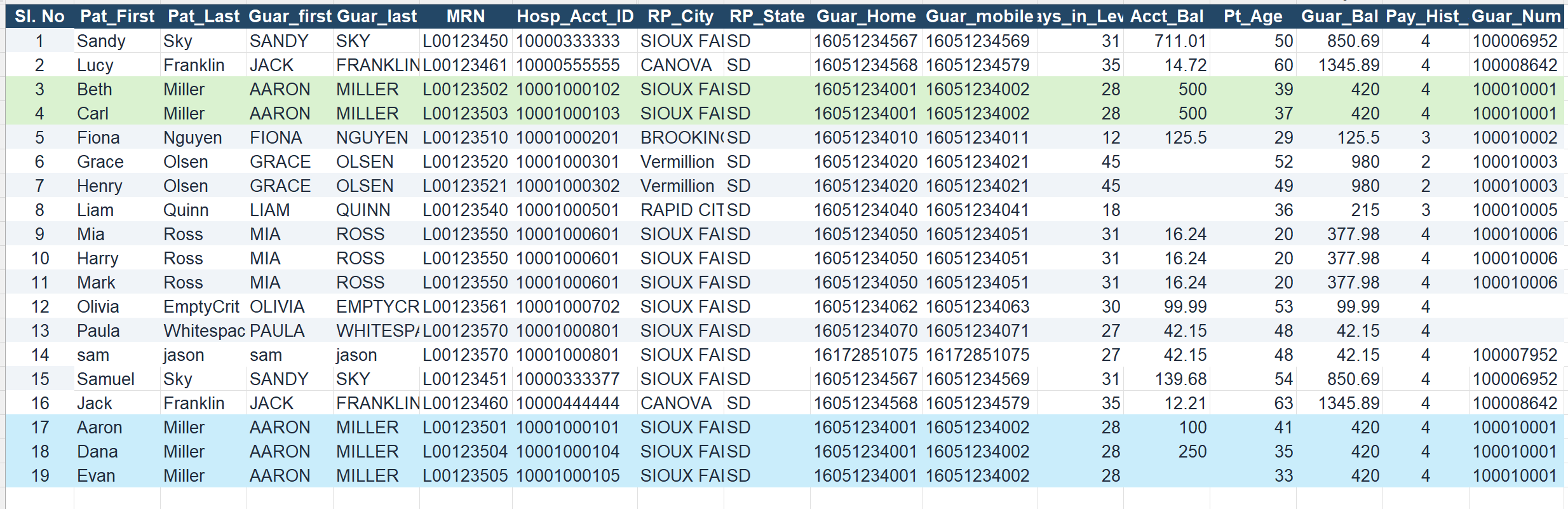
In the below screen shot, 5 patients share the same guarantor, However, the account balance for 3 and 4 patients is 500. The account balance for 17,18,and 19 is 100, 250, and blank respectively.
Hence, the system identified the records 3, 4 as survivor records and marked 17,18, and 19 as duplicate records.
Example 3: Identifying duplicate records of same guarantor for different patients when highest value of an attribute is empty
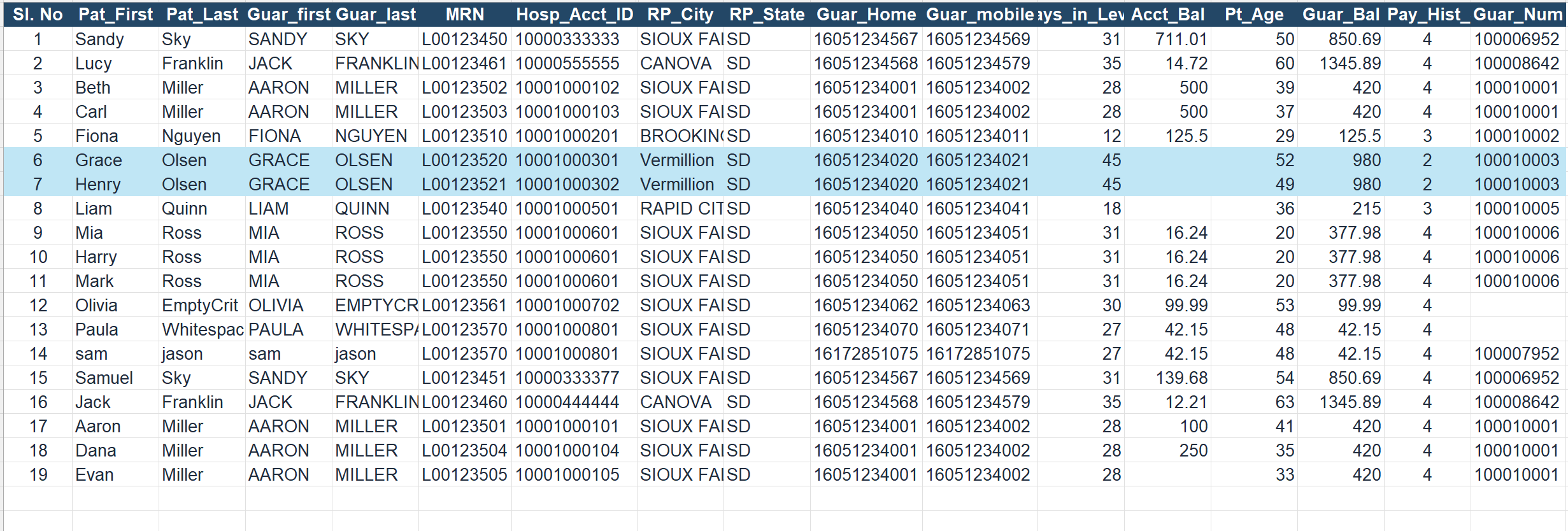
In the below screen shot, sl.no 6 and 7 share the same guarantor, However, the account balance is empty for both the patients.
Hence the system retained both the records as highest value could not be selected.
Example 4: Identifying duplicate records of same guarantor for different patients when highest value of an attribute and lowest value of an attribute is same
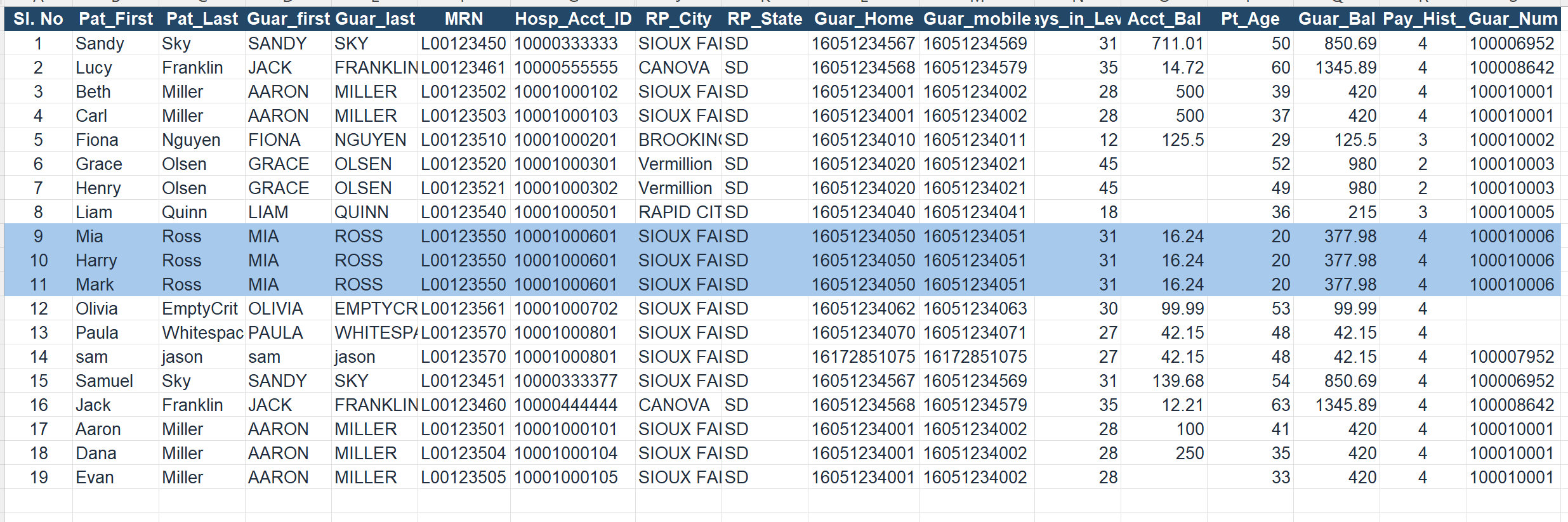
In the below screen shot, sl.no 9,10, and 11 share the same guarantor, However, the account balance is same for the patients.
Hence the system retained all 3 the records as highest value or lowest value could not be selected.
Example 5: Identifying duplicate records when the configured attribute is empty
In the below screen shot, sl.no 12 and 13 has no guarantor,
Hence the system retained both the records as highest value could not be selected.
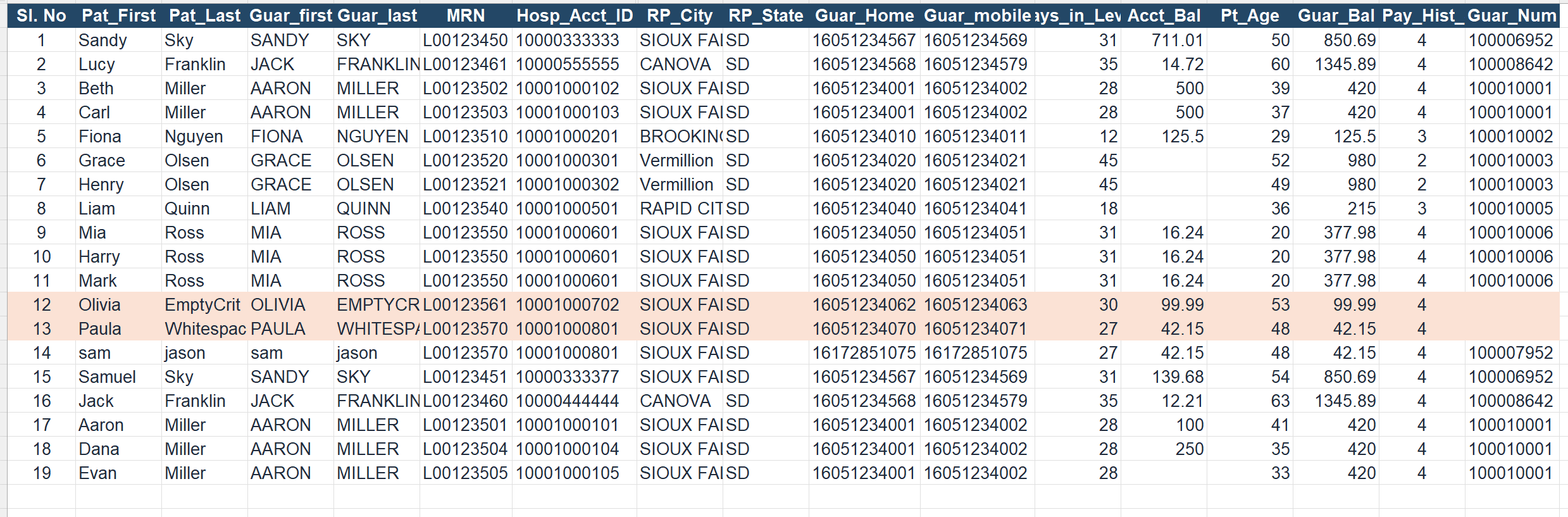
Example 6: Identifying duplicate records of same guarantor for different patients based on lowest value of an attribute
When we will select Lowest value of an attribute of Acct_Bal (Account balance), the system will retain the record with lowest account balance and tag the other record as duplicate.
The system has identified the record 1 and 15 as duplicates.
Example 7: Identifying duplicate records of same guarantor for different patients when lowest value of an attribute and empty value for few records
In the below screen shot, 5 patients share the same guarantor, However, the account balance for 3 and 4 patients is 500. The account balance for 17,18,and 19 is 100, 250, and blank respectively.
Hence, the system identified the record 18 as survivor records and marked 3,4,18,and 19 as duplicate records.
Example 8: Identifying duplicate records of same guarantor for different patients when lowest value of an attribute is empty
In the below screen shot, sl.no 6 and 7 share the same guarantor, However, the account balance is empty for both the patients.
Hence the system retained both the records as lowest value could not be selected.
Example 9: Identifying duplicate records when the configured attribute is empty
When we select the Criterion to select the survivor record from identified duplicates as Lowest value for attribute Acct_Bal (Account balance), the system will retain the records as explained below..
In the below screen shot, sl.no 12 and 13 has no guarantor,
Hence the system retained both the records as lowest value could not be selected.
Example 10: Identifying duplicate records when the configured attribute value is exact match
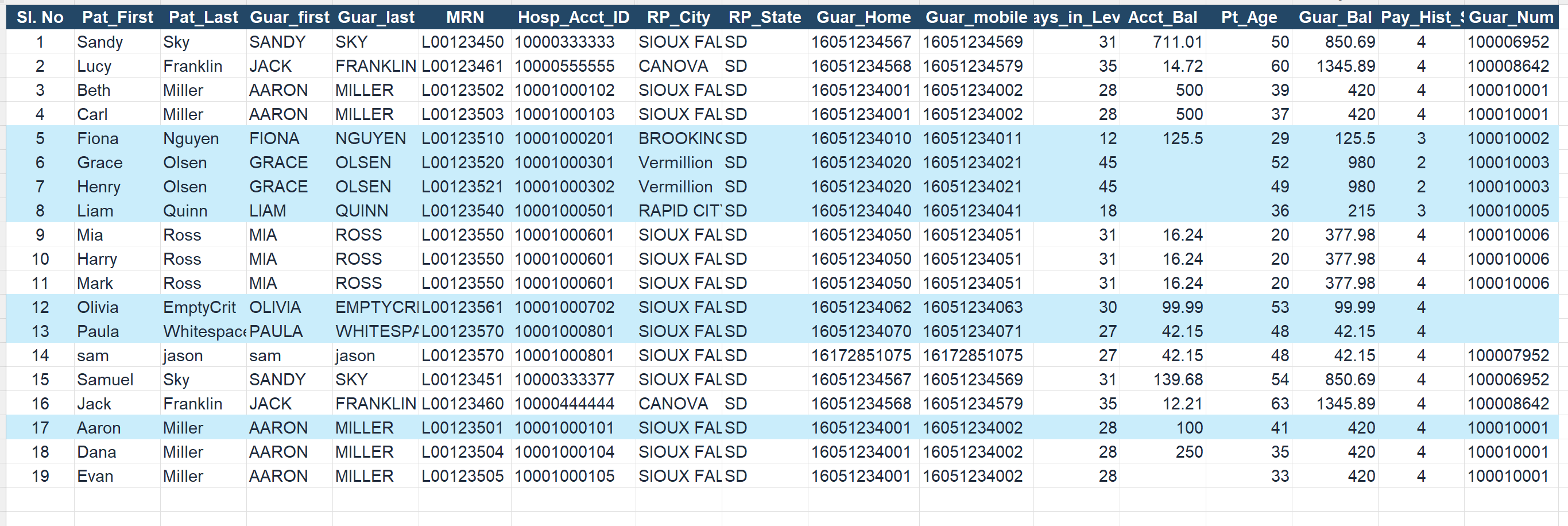
When we select the Criterion to select the survivor record from identified duplicates as exact value as 100 for attribute Acct_Bal (Account balance), the system will retain the records as explained below..
In the below screen shot,
- Sl.no 5 is a unique record hence it is a survivor,
- Sl no. 6, 7, and 8 has empty Account_Bal, hence those are survival records.
- Sl no. 12 and 13 has empty Guar_Num, hence those are survival records.
- Sl no. 17 is exact match, hence it is a survival record.
Remaining all other records will be marked as duplicates.
Example 11: Identifying duplicate records when the configured attribute value is random selection from the duplicates
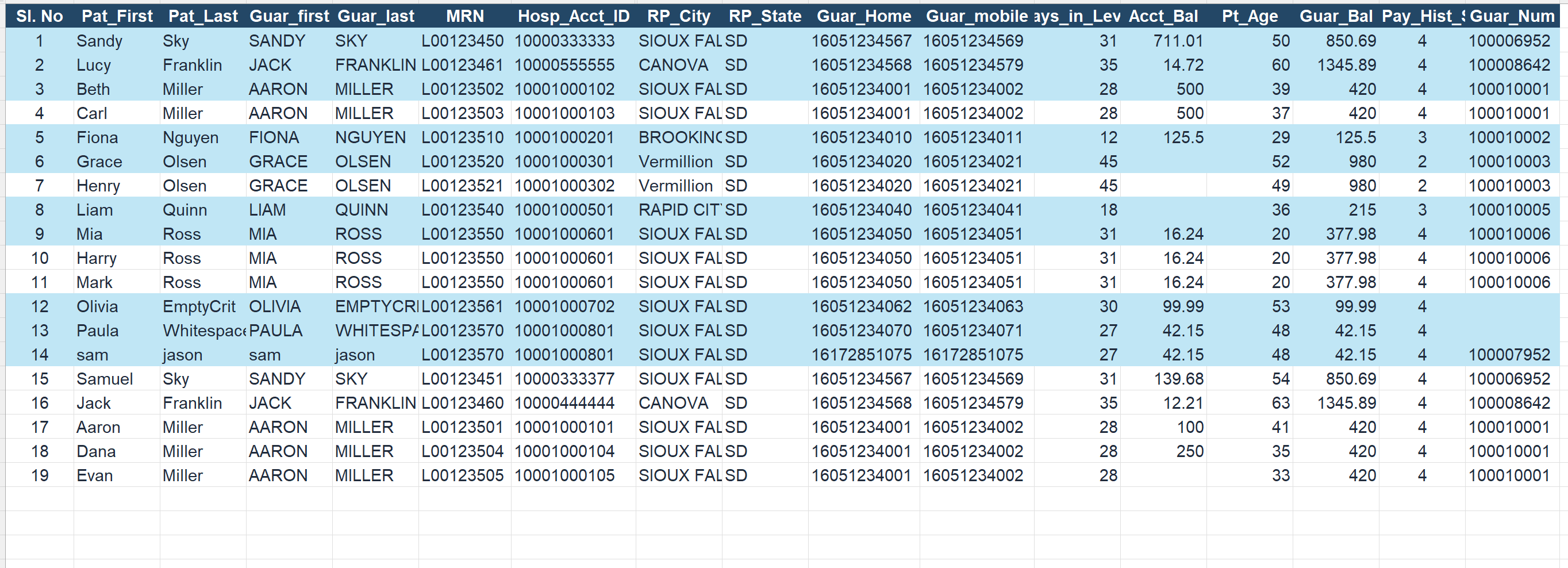
When we select the Criterion to select the survivor record from identified duplicates as Random selection from the duplicates, the system will retain the records that comes first in the list.
In the below screen shot,
- Sl.no 1 and 15 has same Guar_Num, Hence randomly 1st record is a survivor,
- Sl. no 2 and 16 has same Guar_Num. Hence randomly 2nd record is a survivor.
- Sl.No 3 and 4 has same Guar_Num. Hence randomly 3nd record is a survivor.
- Sl no 5 is a unique record, hence it is a survivor.
- sl no 6 and 7 has same Guar_Num. Hence randomly 6th record is a survivor.
- Sl no 8 is a unique record, hence it is a survivor.
- Sl no 9, 10, and 11 share same Guar_Num. Hence randomly 9th record is a survivor.
- Sl no 12 and 13 has empty Guar_Num. Hence they are survivor records.
- Sl no 14 is a unique record, hence it is a survivor.
Updated 1 day ago